


Security Camera App
3.6170.00 Reviews
App Specs
- Version
- 1.0.0.57
- Updated On
- License
- Free
- Downloads
- 1,000,000+
- Developer
- Oreon LLC
- Categories
- House & Home
- Platform
- Android, iOS
Screenshots
 Analysis by AppCompare
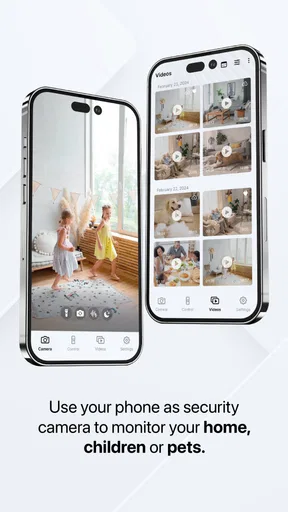
I like the idea of making a spare phone useful again, but a camera app is only as dependable as the device, network, and routine behind it. Security Camera App is aimed at that simple setup: use a phone as a camera and check in from another device. In my view, it makes the most sense as a convenient extra set of eyes for a room, not as a replacement for a dedicated security system.
Where a spare phone fits best
Before setting anything up, I’d decide what I actually need to watch. A fixed view of an entryway, a room where a pet spends time, or a home office while I’m briefly away is a more realistic use than expecting one phone to cover an entire home. Choosing a specific purpose also makes it easier to judge whether the camera’s position and the alerts are useful.
A spare phone can be a practical choice when I want a temporary or low-commitment monitor without buying another camera. A dedicated security camera is usually the better fit for continuous monitoring, a permanent outdoor installation, or a setup shared among several people. This app’s appeal is its use of equipment I already own; the trade-off is that I need to provide and maintain that equipment myself.
A repeatable setup beats a clever one
For a useful view, I’d place the phone where it can see the area that matters without capturing more of the home than necessary. I’d check the image from the viewing phone before relying on it, paying attention to glare, backlighting, and whether furniture or a partly open door blocks the scene. A quick test from the spot where I normally check in can reveal problems that are easy to miss while standing beside the camera phone.
It also helps to treat the camera phone like a small appliance. I’d choose a stable surface or secure support, route the charging cable so it cannot pull the phone out of position, and make sure the device has a reliable Wi-Fi connection. These are mundane details, but a camera that has shifted or lost power is less useful than a less ambitious setup that stays in place.
Settings worth checking before relying on alerts
Motion detection is most useful when its sensitivity matches the room. I’d start by watching the view during normal activity, then adjust sensitivity if everyday movement creates too many notifications or if the events I care about are missed. Pets, curtains, changing light, and movement near a window can all affect what feels like a meaningful alert. I would not assume a setting that works in one room will behave the same way in another.
Notifications are a prompt to check in, not proof of what happened. If I receive an alert, I’d open the live view and assess the situation rather than treating the notification alone as a complete record. For a calmer routine, I’d position the phone to avoid busy areas and decide in advance which movements are worth interrupting my day for.
Worth Reading Before You Choose

Flipboard Shows What News Apps Must Do Beyond the Feed

Switching to Android Auto Means Rethinking Your Driving Routine

Google Calendar Makes a Crowded Week Easier to Manage

Ludo King Makes the Most of the Minutes Between Plans

Baby Panda World Brings Quick Play to Modern Phones, but Its Game Library Feels Busy

ESPN’s Live Game View Makes Following Close Games Easier
Two-way audio can be handy for a quick message to someone at home, but I’d use it thoughtfully. I’d test how it sounds from the camera’s position and avoid relying on it for an urgent conversation. The feature is better suited to a brief check-in than to replacing a call or an in-person conversation.
Everyday use, with realistic expectations
Imagine leaving home to run an errand while a child is in another room with a responsible caregiver. A spare phone positioned in that room could let me check the live view and, if appropriate, use the audio for a short reminder. I would still agree with the caregiver on how to reach them directly, because a camera app depends on the phone and connection and should not be the only way to communicate.
The same approach can help me check whether a pet is settling down or whether a delivery has been left inside an entry area, provided the camera can see that spot. It is less suited to situations where I need a guaranteed recording, a weatherproof camera, or a system designed to deter intruders. Thinking about the consequence of a missed connection is a useful way to decide whether a phone-based setup is enough.
What the app can and cannot replace
Unlike a typical dedicated home camera, a repurposed phone is not a purpose-built device that I can leave installed indefinitely without considering its charging, placement, and general condition. On the other hand, it can be quicker to try when I already have a spare device and only need a view of one indoor space. That is a meaningful difference: convenience and reuse on one side, a more permanent setup on the other.
I’d also keep privacy in the setup process, not just in mind after installation. I would point the camera only where monitoring is appropriate, let other people in the home know it is in use, and avoid placing it in private spaces. If I’m using a device that other people still use, I’d make sure it is genuinely available for this job rather than disrupting their normal access to it.
When another option makes more sense
I would skip this approach if I needed dependable coverage while the household Wi-Fi or power is unreliable, or if a camera must keep working unattended for long periods. A dedicated product may be a better match for outdoor use, broader coverage, or a household that needs a clearly managed shared setup. For a short-term indoor check, though, using a spare phone can be a sensible first step before deciding whether a permanent system is worth buying.
There is also a practical question of whether the old phone is suitable for the job. If its battery is unreliable, its camera view is poor, or it cannot stay connected consistently, the fact that it is available does not make it a good camera. I’d test the complete arrangement during an ordinary day before counting on it while away.
Setting Up: Easier Than You’d Think
Getting started with the Security Camera App was surprisingly straightforward. All you need is an old smartphone or two, and you're good to go. I downloaded the app on both my current phone and an old device that had been gathering dust in a drawer. With a few simple steps, the app was ready to transform my old phone into a security camera.
The interface is super user-friendly. It guides you through the setup process, and before you know it, you’ve got a fully functional security camera right in your home. Just position your old phone strategically, and voilà—instant surveillance.
Features That Stand Out
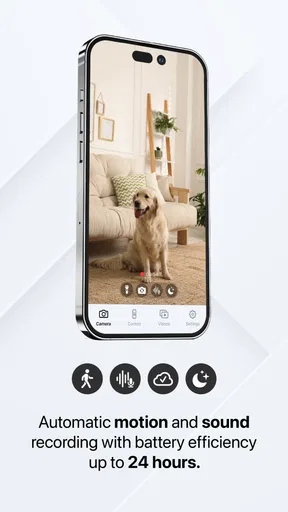
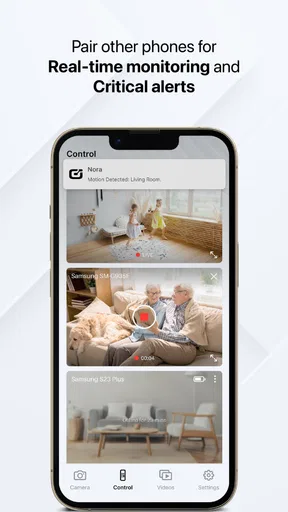
The app packs a punch with its variety of features. First off, there’s the motion detection. The app sends notifications straight to your phone whenever it detects movement, which is great for keeping tabs on any unexpected visitors. You can also adjust the sensitivity to avoid false alarms, like when your cat decides to wander past.
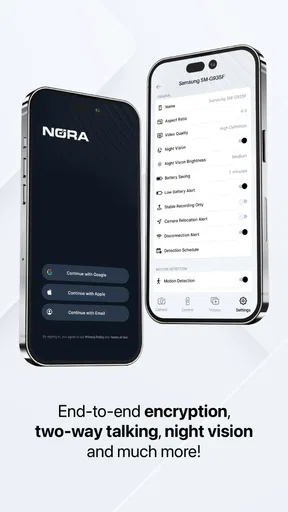
One feature I found particularly useful was the two-way audio. Not only can you see what's happening, but you can also communicate through the app. This came in handy when I needed to talk to my kids while I was out running errands. They were amazed (and a bit freaked out) that I could "talk" to them through the old phone!
Quality and Reliability
When it comes to video quality, the app didn't disappoint. The live feed was clear, and I could easily distinguish everything in the room. Plus, the app supports both high-definition and standard definition, depending on your internet speed. This flexibility ensures that the app works smoothly regardless of your connection.
In terms of reliability, I was impressed. The app didn’t crash or lag, even when I was miles away from home. It’s comforting to know that I can rely on it to keep an eye on things when I’m not around.
Privacy Concerns Addressed
Now, I know what you might be thinking: what about privacy? The Security Camera App takes this seriously. The app offers encryption for all video streams, ensuring that only you have access to your footage. It’s nice to know that my family’s privacy is protected while using this app.
Since a phone camera can feel more personal than a purpose-built device, I’d make the household rules clear before turning it on. I’d also check the view occasionally to ensure it has not drifted toward a private area. The most useful routine is simple: confirm the phone is charging, confirm it is connected, and check the view before leaving. That small habit is more valuable than assuming a camera placed once will stay dependable forever.
A Few Things to Keep in Mind
While the app is pretty solid, there are a couple of things to consider. First, your old phone needs to be plugged in and connected to Wi-Fi to function effectively as a security camera. It's not a big deal if you’re setting it up in one spot, but it does mean you'll need to think about outlet access.
Another point to consider is the app’s impact on battery life. It’s best to keep the phone plugged in, as the camera feature can drain the battery fairly quickly if left unplugged.
Leaving an older phone plugged in for long stretches is a trade-off I would take seriously. I’d use a device in sound condition, keep it somewhere it can stay cool and stable, and check that the cable does not become a trip hazard or pull loose. If the phone gets warm or its battery behaves unpredictably, I would stop using it as a fixed camera and choose another device instead.
There is a cost question beyond the app itself, too. It is free to install, but in-app purchases are available, with individual items ranging from $1.99 to $49.99. I’d first decide whether the basic arrangement meets my needs and review any purchase details in the app before paying. The app is rated for everyone, but that does not change the need to use a camera considerately around other people.
Who I’d Recommend It To
Oreon LLC’s House & Home app is a good fit for someone who already has a spare smartphone, wants to watch one indoor area, and is comfortable keeping that phone powered and online. It has an average rating of 3.8 from around 1.3 thousand ratings, with over one million installs, so there is a sizable audience trying this kind of phone-based setup. The current version is 1.0.0.57, and it runs on Android 6.0 or later.
I would not choose it as my only security measure for a home where a missed alert could have serious consequences. A dedicated camera or professionally designed system is a better option when I need a permanent installation, broader coverage, or a setup built around continuous monitoring. The useful question is not whether a spare phone can show a room; it is whether that view is enough for the job I have in mind.
Final Thoughts
Overall, the Security Camera App is a fantastic solution for those looking to enhance their home security without breaking the bank. It’s easy to set up, packed with useful features, and offers peace of mind by turning your old phones into vigilant guardians of your home.
If you’ve got an unused smartphone lying around, why not give it a try? It’s a smart and practical way to boost your home’s security. Plus, it feels pretty cool to repurpose old tech into something so useful!
My verdict is that it works best when I treat it as a focused indoor monitor and build a repeatable routine around it: choose one view, secure the phone, check the connection, and test alerts in the conditions where I plan to use them. Oreon LLC released the app on July 2, 2024, and its free starting point makes it easy to consider, while optional purchases mean I would check costs before committing. If that modest role matches your needs, it is a practical way to put an idle phone to work; if you need guaranteed, round-the-clock protection, I’d choose a purpose-built alternative.
Pros
- Easy setup with clear instructions.
- High-quality video streaming.
- Real-time alerts for motion detection.
- Compatible with multiple devices.
- Remote access from anywhere.
Cons
- Subscription required for advanced features.
- Consumes significant battery power.
- Occasional lag in video feed.
- Limited free storage for recordings.
- Some features require strong Wi-Fi.
FAQs for Security Camera App
Is the Security Camera App compatible with all devices?
The Security Camera App is designed to work with a wide range of Android and iOS devices. However, compatibility may vary depending on the device’s operating system version and hardware specifications. It's recommended to check the app's requirements on the download page to ensure your device is supported.
Does the Security Camera App require a subscription?
The app offers both free and premium versions. While the free version includes basic features, a subscription unlocks advanced functionalities such as cloud storage, extended recording time, and higher video resolution. Before downloading, consider your needs and whether the subscription features align with them.
How secure is the data captured by the Security Camera App?
Security is a top priority for the Security Camera App. It uses end-to-end encryption to protect your video feeds and stored data. Additionally, regular updates ensure security protocols are up-to-date. Always check the app's privacy policy to understand how your data is handled and stored.
Can I access my camera feeds remotely?
Yes, the Security Camera App allows remote access to your video feeds through a secure internet connection. This feature is particularly useful for monitoring your home or office while on the go. Ensure you have a stable internet connection for seamless remote access.
What features are available in the free version of the Security Camera App?
The free version of the Security Camera App includes basic features such as live streaming, motion detection, and limited recording time. While it provides essential security functions, upgrading to the premium version unlocks additional features like HD recording, cloud storage, and advanced motion alerts.


